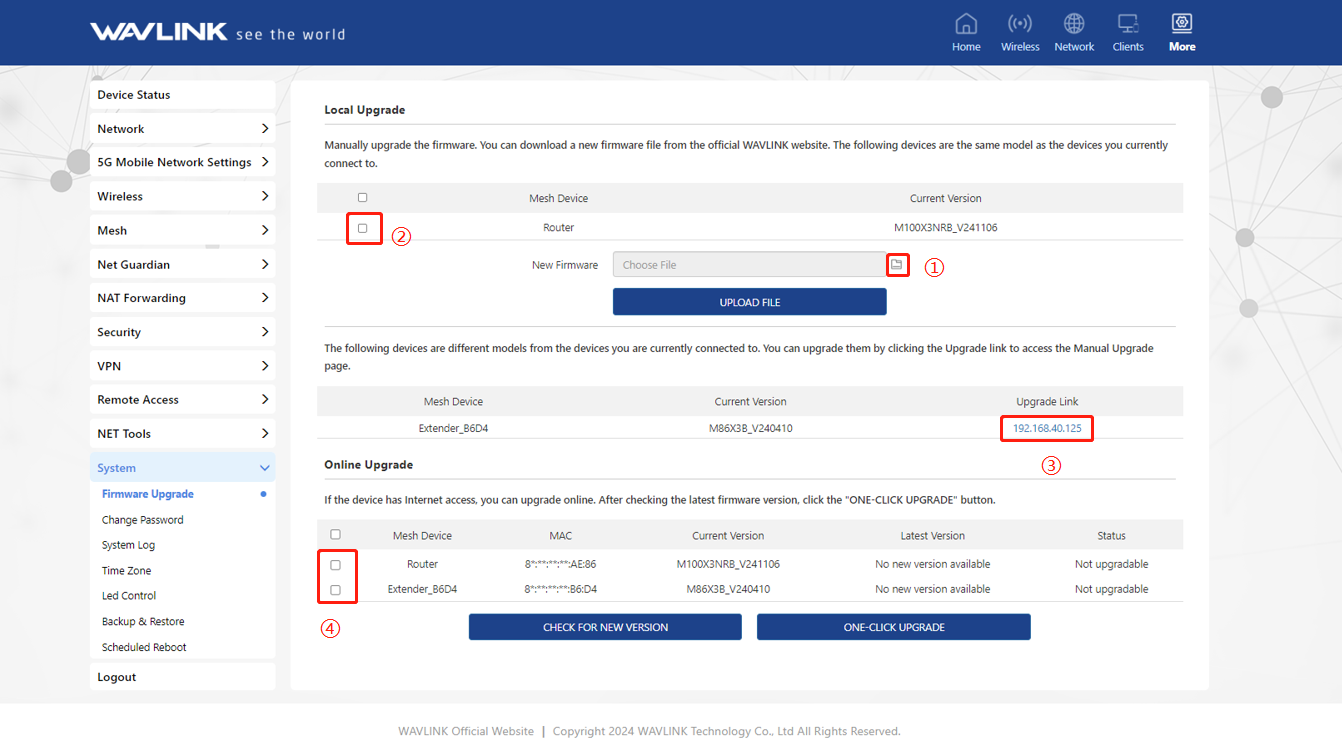
Firmware Upgrade
This chapter contains the following sections:
Option I: Local Upgrade
- Download the latest firmware file from WAVLINK website.
- Extract the firmware from the downloaded file.
- Log in to http://wavlogin.link, then click “More”, enter System and click “Firmware Upgrade”.
- Click on ① to locate the extracted firmware file.
- Click on “ UPLOAD FILE” and choose “Apply”, and wait for the firmware upgrade process to complete.
Note: If your all mesh routers are the same model, you can check and upgrade your routers together at ②. If the models of your routers are not the same, please visit the web interface of each router and upgrade it in ③.
Option II: Online Upgrade
- Log in to http://wavlogin.link, click “More”, enter System and click “Firmware Upgrade”.
- Select the Mesh Node Name in ④ that needs to be upgraded.
- Click “CHECK FOR NEW VERSION” to find the latest version.
- Click “ONE-CLICK UPGRADE”, and wait for the firmware upgrade process to complete.